
Reviewing Participant Progress in Driven Pro Admin Area allows you to monitor where each participant is up to within a program, including Pre-Work, certification, results, and recent activity. The information available may vary depending on the program and delivery format.
Access Participant Progress
Step 1: Open the Programs Section
Log in to your Driven Pro account.
Go to the Programs section from the main menu.
Locate and open the program you want to review.
Step 2: Locate the Participant
Within the program, find the participant whose progress you want to review.
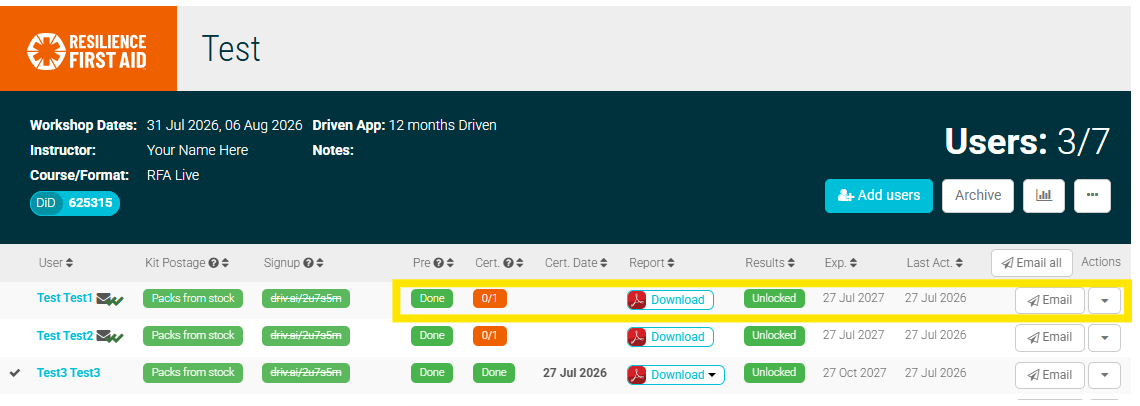
Each participant has their own row, with columns showing their current progress and available information.
Review Participant Progress
Depending on the program, you may see the following columns:
Pre: Shows the participant's Pre-Work progress. When the required Pre-Work has been completed, the status will show Done or the relevant completion status.
Cert.: Shows the participant's certification progress. Once all required certification steps have been completed, the status will show Done.
Cert. Date: Displays the date the participant completed their certification.
Report: Allows you to access or download the participant's report, where available.
Results: Shows whether the participant's results are available or currently locked.
Exp.: Displays the participant's expiry date, where applicable.
Last Act.: Shows the date of the participant's most recent activity in Driven.
Follow Up With Participants
If a participant has not completed a required step, you can use the options available within their row to follow up:
Click Email to contact the participant directly.
Use the down arrow on the right side of the participant's row to access additional participant options.
Continue monitoring the relevant progress columns to confirm when each stage has been completed.
Important Notes
The columns displayed may differ depending on the type of program and delivery format.
A Done status confirms that the relevant stage has been completed.
Use Last Act. to help identify participants who may not have accessed or progressed through the program recently.
Need More Help?
If you have further questions or need assistance reviewing participant progress, please contact our Support team at support@hellodriven.com. We're here to help.