
The Invite feature in Driven Pro allows practitioners and administrators to quickly invite existing users to a new assessment or assign them directly to an existing program.
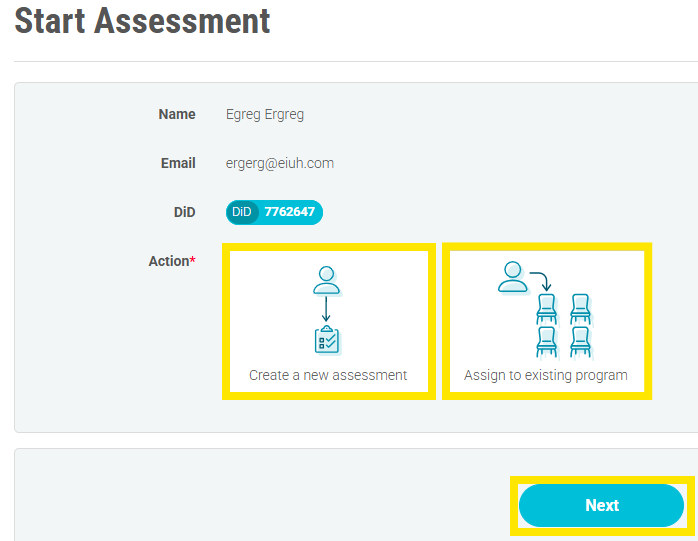
ℹ️ Two Invitation Options: Clicking Invite next to any participant gives you two primary paths:
Create a New Assessment: Start a fresh assessment or program for the participant.
Assign to Existing Program: Add the participant directly to an already established program cohort.
Where to Find the Invite Button
The Invite button is located next to each participant in the Users section of your Driven Pro account.
Log in to your Driven Pro account and go to the Users section from the main menu.
Locate the participant you wish to invite. Participants may be listed inside a company group or unassigned to a group.
Click the Invite button beside their name.

How to Use the Invite Feature
After clicking Invite, select one of the two options presented on screen:
Option 1: Create a New Assessment
Select Create a New Assessment.
Choose the assessment or program you want to use and complete the required details.
Click Next and follow the remaining prompts to send the invitation to the participant.
Option 2: Assign to Existing Program
Select Assign to Existing Program.
Choose from your list of available pre-set programs.
Click Assign to add the participant directly to that program.
Best Practices for Invitations
Use Search: Use the Search function in the Users section to quickly locate participants.
Verify Details: Check participant details before sending a new invitation to ensure contact info is up to date.
Monitor Progress: Once assigned or invited, you can monitor ongoing progress and manage participation via the Programs section.
Troubleshooting & Support
If you encounter issues sending invites, assigning programs, or locating participants in your user directory, please reach out to our support team via Support in Driven Pro or email us directly at support@hellodriven.com.