
The Open Invites feature in the Users section of your Driven Pro account helps you track assessment invitations you have sent out, ensuring participants complete their assessments on time for program success.
ℹ️ Individual Invites Scope: The Open Invites view only displays individuals you have invited directly. It does not track participants assigned to Group Programs.
Where to Find the Open Invites Button
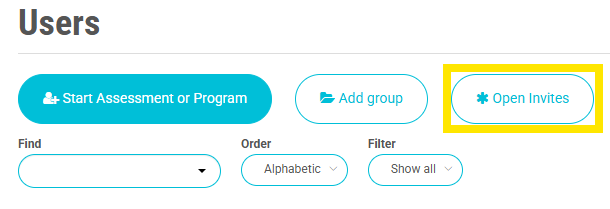
The Open Invites button is located in the Users section of your Driven Pro account, right next to the Start Assessment or Program and Add Group buttons.
Log in to your Driven Pro account.
Click Admin.
Go to the Users section from the Driven Pro Menu.
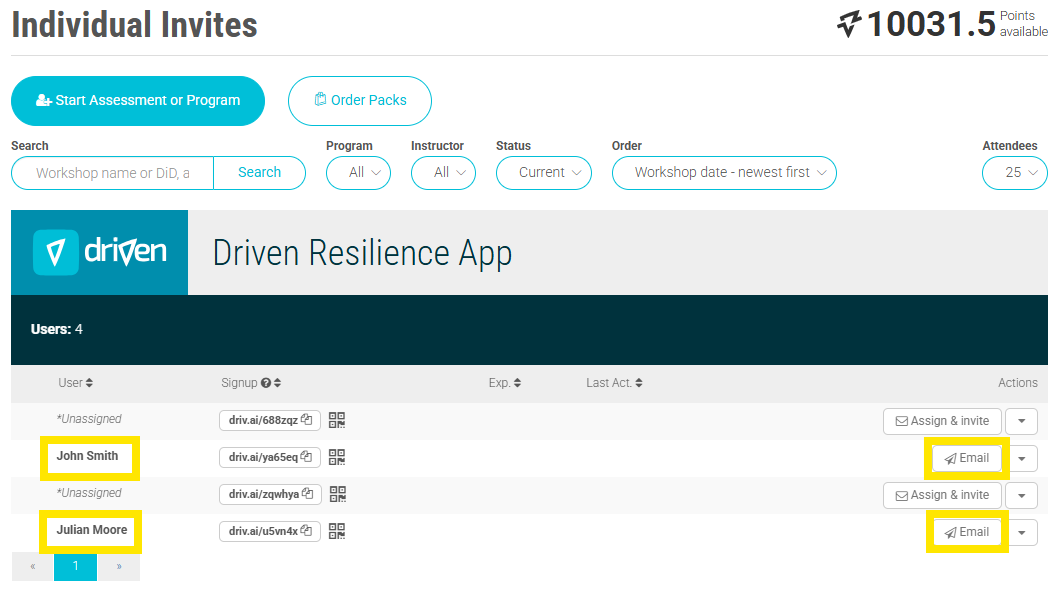
Click the Open Invites button to view a list of all outstanding individual assessment invites.
How to Use the Open Invites Feature
Monitor Outstanding Invites: Instantly view anyone who still needs to finish their assessment.
Real-Time Updates: The list updates automatically in real time as participants start or complete their assessments.
Review and Follow-Up: Use the list to identify pending users, send friendly reminders, or encourage completion. Once participants complete their assessment, they are automatically removed from the list.
Best Practices & Important Notes
Check Regularly: Make it a habit to check the Open Invites list to keep your programs running smoothly.
Group Programs Excluded: Remember that Group Program participants do not appear in this individual view.
Live Updates: The list updates dynamically - there is no need to manually refresh or check back later.
Troubleshooting & Support
If you experience issues tracking pending invites or need assistance following up with participants, please reach out to our support team via Support in Driven Pro or email us directly at support@hellodriven.com.