
Converting a Live Workshop to an Online Format enables your participants to continue their resilience training remotely, ensuring flexibility and accessibility. This guide will walk you through the step-by-step process to switch a live Driven Resilience workshop to an online format for one or more participants using your Driven Pro Admin Area.
When to Convert a Live Workshop to Online
If participants are unable to attend scheduled live sessions, converting their workshop format allows them to complete the training online at their own pace. This option is available for programs such as Resilience First Aid (RFA) and HART.
Step-by-Step: Convert Live Workshop to Online
Step 1: Access Driven Pro
Log in to your Driven Pro account.
From the main menu, select Programs.
Step 2: Locate the Program
Find the specific live program you wish to convert. You can use the search bar or browse your list of programs.
Step 3: Select Participants to Convert
Within the program details, identify the participant(s) who need to switch to the online format.
On the right side of their row, click the down arrow to show the available options.
Click the Convert to Online option next to the relevant participant(s).
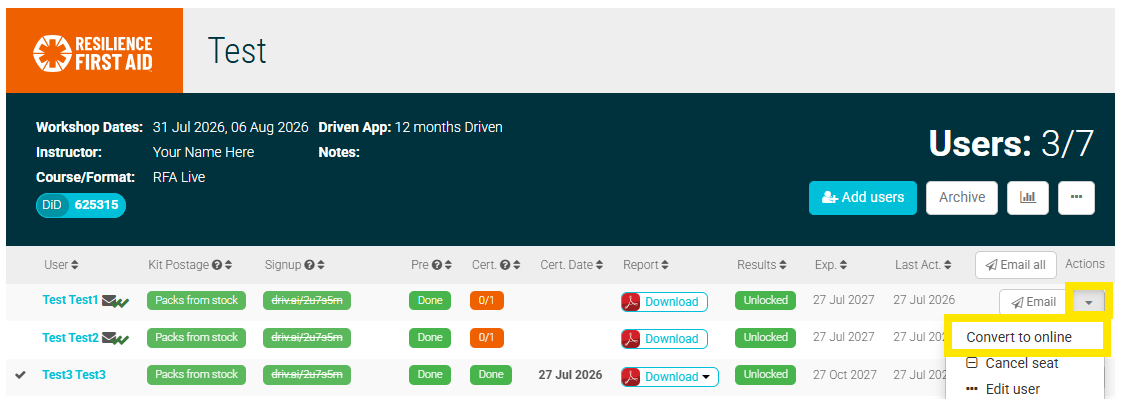
Step 4: Confirm and Pay the Difference
A new page will open, displaying the cost difference between the current (live) format and the fully online format.
Review the details and proceed to pay the difference as required to complete the conversion.
After Conversion
The selected participants will be enrolled in the online version of the workshop.
They will receive updated access instructions and can begin their online training immediately.
You can monitor their progress and send reminders as needed from the Programs section.
Frequently Asked Questions
Can I convert multiple participants at once? Yes, you can convert any or all participants in a program to the online format as needed.
Will participants keep their progress? Progress in pre-work or modules already completed will be retained if the format is converted, but always confirm before proceeding.
What if I need help? If you have questions or need direct support, please use the Contact Us option in Driven Pro to submit a request.
Tips for Managing Online Programs
Use the Send Reminder feature to encourage participants to stay engaged and complete their training.
Monitor participant activity and certification status directly from the Programs dashboard.
For any shipping considerations (e.g., RFA Packs), ensure the correct shipping method is selected for online participants.
Converting live workshops to online ensures your resilience programs remain accessible and effective for all participants, regardless of their circumstances.