
The Archive feature in your Driven Pro Admin Area helps keep your workspace organized by moving completed or inactive workshops out of your active program list. This process ensures easy access to program history while maintaining participant access to their wellness resources.
When to Archive a Program
Programs should be archived when they have concluded or are no longer active. Archiving is ideal for:
Completed workshops or training sessions
Programs that will not be used in the near future
Maintaining a clear distinction between current and past activities
How to Archive a Program
Step 1: Access Driven Pro: Log in to your Driven Pro account and navigate to the Programs section from the main menu.
Step 2: Locate the Program: Find the specific program you wish to archive. You can use the search bar or filters (such as program name, instructor, or status) to quickly locate it.
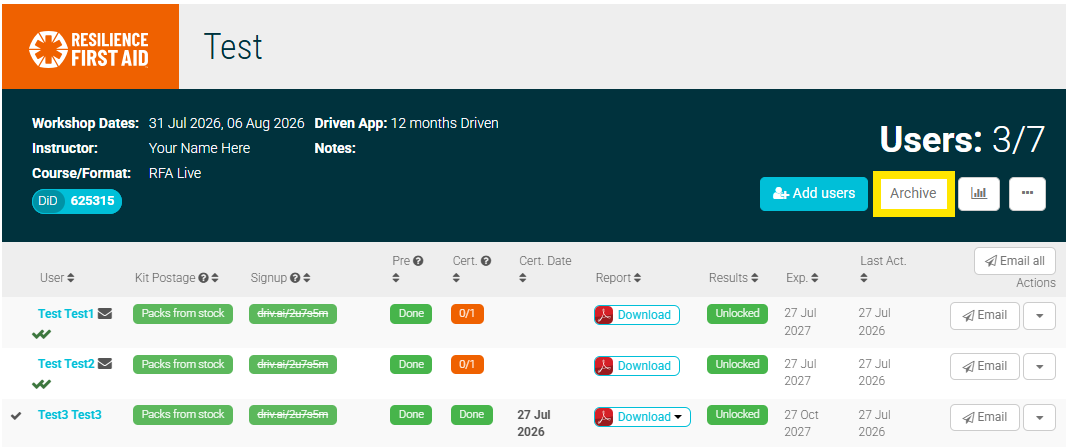
Step 3: Archive the Program: Click the Archive option at the top of the program details page. Once archived, the program will be moved out of your current programs list but remains accessible under the Archived filter for future reference.
What Happens After Archiving?
Coach Access: The workshop is closed for coaches, making it easier to focus on current activities.
Participant Access: Participants who have activated their content within the program retain access to Driven and all associated resources. Their accounts and progress are unaffected by the archive action.
Unused Seats or Links: Any unused seats or invitation links within the program can still be used for registration, so if these should not be available, be sure to remove any empty seats before archiving the program.
Viewing Archived Programs
In the Programs section, you can filter programs by status:
All: Displays every program you have created.
Current: Shows only active (ongoing) programs.
Archived: Lists only programs that have been archived.
Best Practices
Archive programs promptly after completion to maintain a streamlined workspace.
Use filters to quickly access archived programs when you need to review past activities or participant records.
Remember, archiving does not delete any program data or participant progress.
Troubleshooting & Support
If you have additional questions or require direct support, please contact us. We are here to help you manage your programs efficiently.