
DiD, or Driven Identification, is a key concept within the Driven Pro Admin Area. It provides a unique identifier for every program and participant, making it easy to locate, manage, and track your workshops and user progress. Understanding how DiD works is essential for effective program administration and participant management.
What is DiD (Driven Identification)?
DiD stands for Driven Identification number. It is a distinctive, automatically assigned identifier used to:
Identify each program you create in Driven Pro.
Assign a unique code to every participant enrolled in a program.
This system streamlines organization, search, and reporting across all your workshops and resilience activities.
Where to Find a Program's DiD
Each program you set up in Driven Pro is assigned its own DiD. To locate it:
Access the Programs section in Driven Pro.
Open the specific program you wish to review.
The program's DiD will be displayed in the program header.
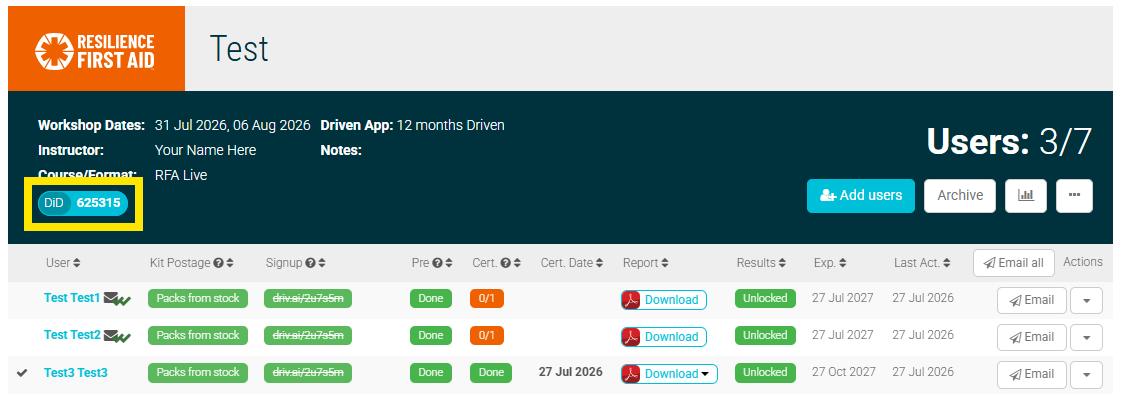
How to Find a Participant's DiD
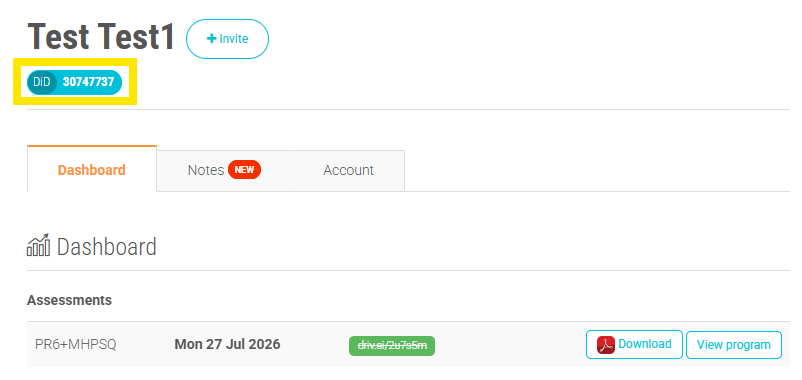
Every participant added to a program also receives a unique DiD. To find a participant's DiD:
Within the Programs section, select the relevant program.
Click on the participant's name in the participant list.
You will be redirected to the User page, where the participant's DiD is shown at the top.
Using DiD for Search and Management
The DiD system is integrated into Driven Pro's search and filter features, allowing you to:
Quickly locate a specific program by entering its DiD in the search bar.
Find a particular participant using their DiD.
Efficiently manage large numbers of programs and users, especially when running multiple workshops or assessments.
Why Is DiD Important?
DiD numbers help coaches, administrators, and program managers:
Reduce confusion between similarly named programs or participants.
Speed up support and troubleshooting by referencing a unique identifier.
Enhance data accuracy in reporting and exporting user or program data.
Best Practices
Always reference the DiD when contacting support for specific program or participant queries.
Use DiD numbers in your internal records for consistent tracking across multiple programs.
Encourage your team to use DiD for searching and filtering to maximize efficiency in Driven Pro.
Summary
The DiD or Driven Identification number is a foundational tool for organizing, searching, and managing your programs and participants within the Driven Pro platform. By leveraging DiD, you ensure streamlined operations and accurate tracking as you deliver resilience coaching and wellness programs.
Troubleshooting & Support
If you have further questions or need assistance regarding DiD or account tracking, please contact our support team via Support in Driven Pro or email us directly at support@hellodriven.com.