
The Assessment Comparison Report in Driven Pro enables coaches and program administrators to compare participant assessment scores over time. By measuring baseline results against post-training progress, you can evaluate training impact, demonstrate ROI, and tailor ongoing coaching strategies for individuals or cohorts.
ℹ️ Supported Assessments: Comparison reporting is available for PR6 (Standard 16-item), PR6-50 (Research 50-item), PRE-Extended (84-item), JSECC+PURE, and Big5 assessment tracks.
How to Access Comparison Reports
Individual Participant Reports
Log into Driven Pro and select Programs from the left sidebar.
Locate the relevant program and search for the participant's name.
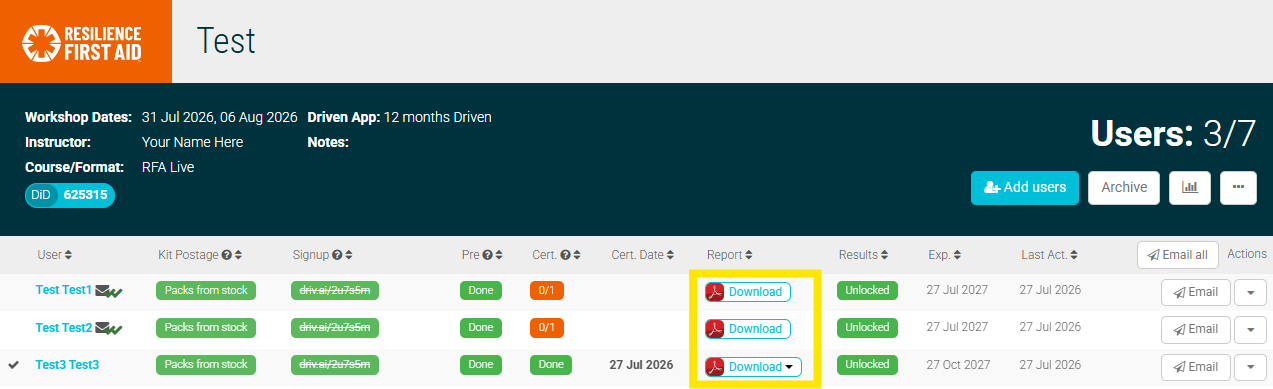
In the Report column, click the download icon to view all completed assessments.
Select the comparison report at the bottom of the list and click Download.
Group & Cohort Comparison Reports
Navigate to Programs and locate the desired cohort program.
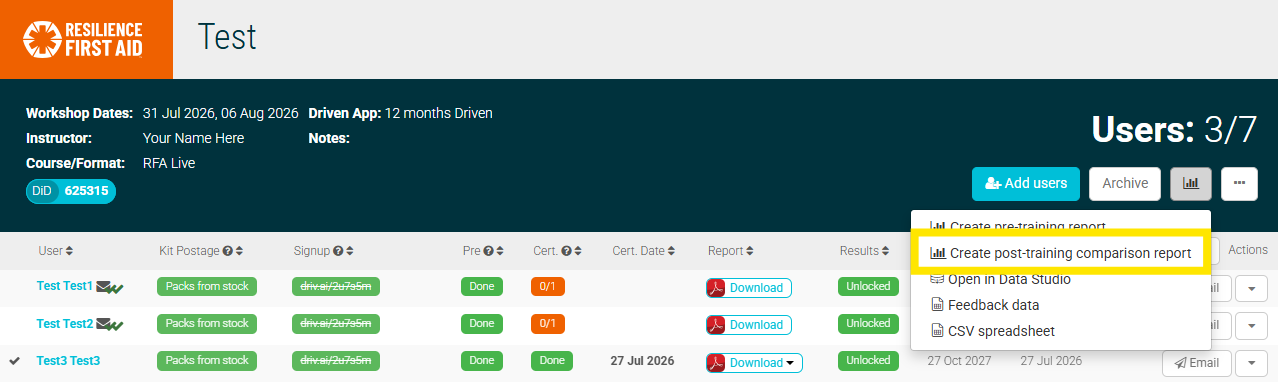
Click the Stats icon next to the program title.
Select Create a group report of the Post-training Comparison to generate and download the aggregated PDF report.
Best Practices & Export Options
Data Studio Exports: For advanced reporting, use Data Studio to export aggregate PDF reports or raw CSV files. Apply demographic filters to refine data by department, location, or cohort subgroup.
Quick Access via Users Menu: You can also download the latest group report by navigating to Users and clicking the Stats icon next to any group.
Ensure Both Submissions: Confirm participants complete both pre-training baseline and post-training assessments to ensure comparison reports generate accurately.
Dual-Level Analysis: Review individual reports alongside cohort summaries to identify both high-need participants for 1-on-1 coaching and broad domain strengths across the organization.
Troubleshooting & Support
If you experience issues generating comparison reports, applying demographic filters in Data Studio, or interpreting participant growth scores, please contact our practitioner support team via Support in Driven Pro or email us directly at support@hellodriven.com.