
Managing your personal and account details in the Driven platform keeps your profile up to date and ensures seamless access to resilience assessments, daily activities, and coaching tools. Whether you are a general user or a CReC-certified practitioner, you can manage all profile, company, and billing settings in one place.
ℹ️ Public Directory Visibility: Certified Resilience Coaches can publish their credentials and bio directly to the public Find a Coach Directory by toggling their visibility inside the Public Profile tab.
Accessing Your Account Details
Open your web browser and go to https://hellodriven.com/login
Enter your registered email address and password, then click Next.
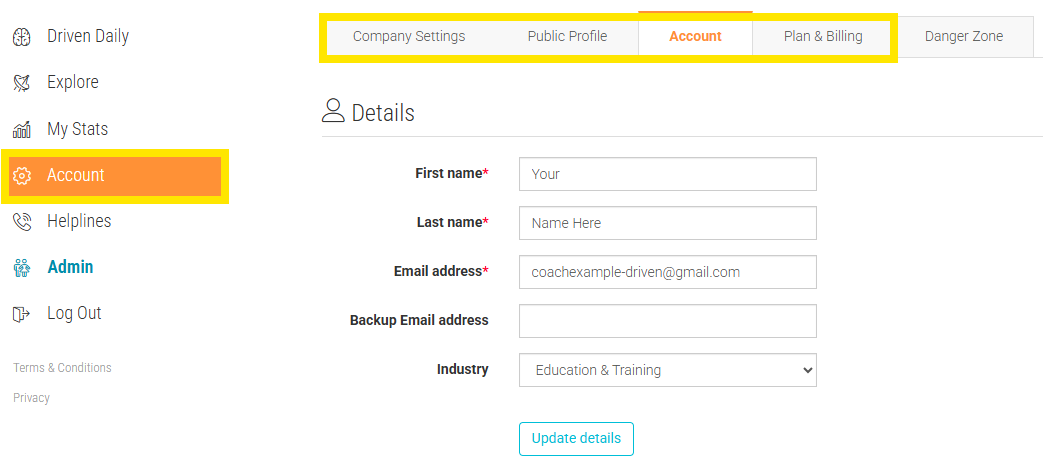
Once logged in, navigate to the main menu on the left side of the screen.
Click on Account to access your account management options.
What Details Can You Manage?
Once inside the Account area, select any tab along the top navigation bar to update your settings:
Public Profile: Edit your visible display name, professional title, coaching availability (In-person/Online), coaching style/level, primary location, external website, bio, and headshot image. Also includes the toggle to hide or publish your listing in the coach directory.
Account Details: Change your primary account login email address, update your password, manage language preferences, and check active login sessions.
Company Settings: (Practitioners/Admins) Update your organization's business details, contact info, and track point pack inventories.
Plan & Billing: View saved credit cards, apply redemption/discount codes, check company credit balances, and download past PDF invoices.
Danger Zone: Access account archiving or permanent account deletion options.
After editing fields in any tab, click Save Details or Update at the bottom of the section to apply your changes.
⚠️ Shared Device Security: For security, always click Log Out in the left sidebar menu after updating your details when using a public or shared computer.
Troubleshooting & Support
If you experience issues changing your account email, resetting your password, or updating billing details, please contact our support team via Support in Driven Pro or email us directly at support@hellodriven.com.