
The Track Packs feature in the Driven Pro Admin Area makes it easy for coaches and program administrators to monitor the shipping and delivery status of Resilience First Aid and HART Packs "Kits" for their resilience workshops. This article guides you step-by-step on how to track your packs, understand shipment statuses, and ensure participants receive their materials on time.
How Track Packs Works
The Track Packs feature is available for programs using either Individual shipment or Consolidated shipment methods:
Individual Shipment: Each pack is shipped directly to a participant's address as they sign up for the program.
Consolidated Shipment: All packs are shipped together to a single address (for example, the coach or organization).
💡 For programs using packs from existing stock, tracking is not required since the coach distributes the materials directly.
Step-by-Step: Tracking Your Packs
Step 1: Access Driven Pro
Log in to your Driven Pro Admin account.
Navigate to the Programs section from the main menu.
Step 2: Locate Your Program
Find the specific program you want to track.
Step 3: Check the 'Kit Postage' Column
Within your program's dashboard, look for the Kit Postage column next to each participant or shipment group.
-
The status label provides real-time updates for each pack:
Not Posted: White label - Packs have not been shipped yet.
Posted x Date: Green label with shipping date - Packs have been shipped. Click the label to view tracking details. Both coach and participant receive email notifications.
Packs from Stock: Green label - Packs are supplied from existing stock by the coach (no shipping required).
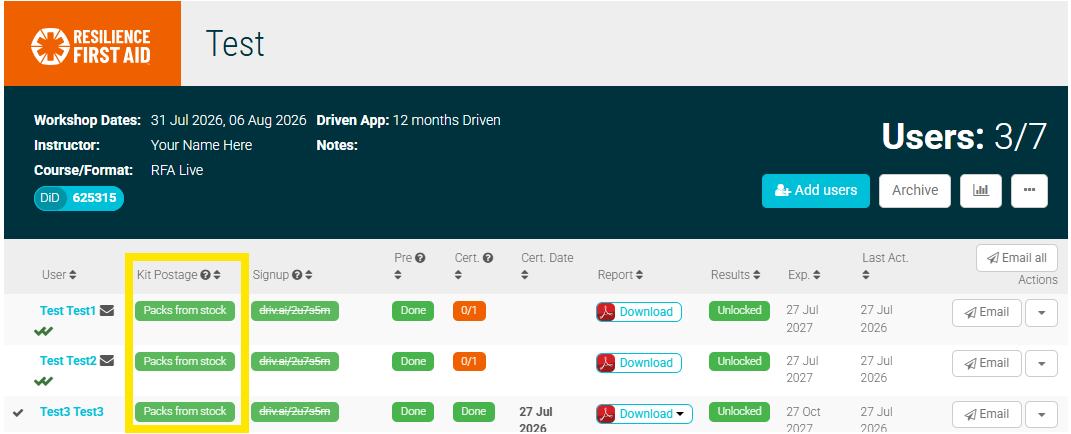
Shipment Status: What Each Label Means
Not Posted: No shipment has occurred. You may need to check your order or shipping details.
Posted x Date: The pack has been shipped. Click the label for courier tracking information. Email notifications are sent to both the coach and participant.
Packs from Stock: Materials are managed and distributed by the coach. No further tracking is needed.
Tips for Efficient Pack Tracking
Regularly monitor the Packs Postage status, especially before your workshop begins.
For individual shipments, remind participants to check their email for tracking updates.
For consolidated shipments, ensure the receiving address is correct and someone is available to accept delivery.
If any issues arise, use the tracking details or contact Driven support for assistance.
Frequently Asked Questions
Can I track packs for all types of programs? Track Packs is available for programs using RFA and HART packs with individual or consolidated shipment methods.
Where do I find tracking numbers? Click the green Posted x Date label in the Kit Postage column to view shipment tracking details.
What if my pack is marked as 'Not Posted'? Check your order status or contact support if there is a delay.
Need More Help?
If you have further questions or need support, please Contact Us and our team will assist you as soon as possible.