
The Driven Pro Menu is the central management hub for CReC-certified coaches, practitioners, and administrators. It provides streamlined access to participant management, cohort reporting, program setup, and coaching resources.
Accessing the Driven Pro Menu
To access Driven Pro features, log into your account using a desktop web browser for the best administrative experience:
Open your web browser and go to https://hellodriven.com/login
Enter your registered email address and password, then click Next.
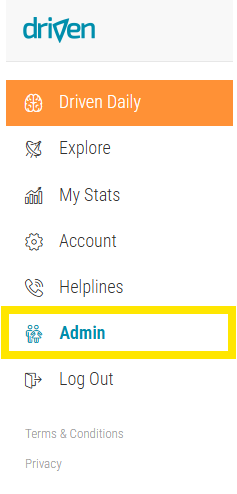
Once logged in, locate the left-hand sidebar navigation menu.
Click Admin to open the Driven Pro menu.
ℹ️ Note: Keeping your profile and participant details up to date ensures seamless access to assessments, daily activities, and coaching resources.
Driven Pro Menu Options
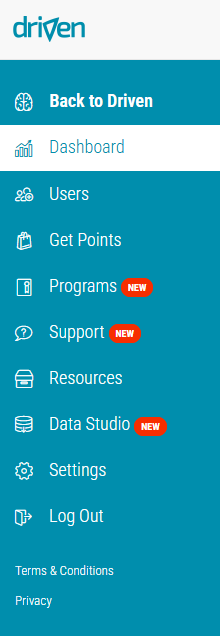
The Driven Pro sidebar menu provides quick access to practitioner tools:
Dashboard: View high-level participant engagement, activity completion rates, risk referrals, and overall group mood scores.
Users: Organize participants into groups, edit user details, assign individual/cohort permissions, and launch resilience assessments.
Get Points: View your current points balance, upgrade your Driven Pro subscription, or purchase additional points to assign assessments and app access to clients.
Programs: Create, assign, and monitor active training programs, workshops, and assessment tracks.
Support: Access knowledge base articles, submit support tickets, or interact with V, Driven's AI support assistant.
Resources: Access a library of coaching guides, workshop materials, slide decks, and participant documentation.
Data Studio: Generate and export detailed analytics reports on program participation, domain growth, and group outcomes.
Settings: Manage company settings, billing details, subscription plans, and bonus feature unlocks.
Log Out: Securely sign out of your Driven Pro account.
Navigating Between Driven & Driven Pro
To switch back to your personal resilience account at any time, click Back to Driven at the top of the Driven Pro menu.
Best Practices for Practitioners:
Initial Setup: Start in Programs to configure your active cohort or workshop tracks.
Participant Onboarding: Use Users to invite participants and assign them to their respective groups or coaches.
Ongoing Monitoring: Check Dashboard weekly for real-time engagement alerts, and use Data Studio to export progress reports for key stakeholders.
Troubleshooting & Support
If you experience issues accessing Driven Pro features, assigning participant points, or managing groups, please contact our practitioner support team via the Support menu item in Driven Pro or email us directly at support@hellodriven.com.