
The Driven Pro platform offers a comprehensive set of tools for coaches and organizations to support resilience and wellness. Two of the most important features within Driven Pro are the Users page and the Programs section. Understanding the differences between these two areas will help you manage participants and deliver effective resilience training more efficiently.
Users vs Programs
The Users and Programs sections are available in the Driven Pro Menu. Both sections serve different purposes and are only available to CReC-certified practitioners with an active Driven Pro account.
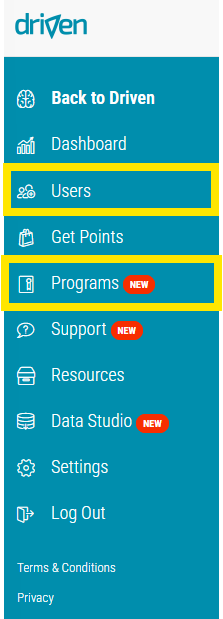
Users: Manage People, Groups and Invitations
The Users section is where you manage the people within your Driven Pro account. You can organize users into groups, view individual profiles, send assessment invitations, start programs, and manage open invitations.
Manage Users and Groups: Organise users into groups based on teams, departments, cohorts, or another structure that works for you. Each user can belong to one group at a time, and users or groups can be moved as needed.
Manage Individual Activity: From the user profile, you can open linked programs when available or cancel an open individual assessment invitation.
Manage Open Invitations: View individual assessment invitations that are still waiting to be completed. Once the assessment is completed, the invitation is automatically removed from Open Invites.
Start Assessments or Programs: Invite an individual to complete an assessment, or create an assessment, workshop, or program for multiple participants.
Invite Groups to Programs: Select users from an existing group and invite them into a new program. You can add or remove users and update participant details before continuing with the program setup.
Review User Profiles: Open an individual user's profile to view their participant information, current assessment and program invitations, completed assessment reports, and when their Driven App access expires.
Programs: Facilitate Assessments and Workshops
The Programs section is where you run resilience assessments, workshops, and other structured activities with your users. Programs are designed for flexibility and ongoing engagement.
Run Assessments & Workshops: Programs allow you to assign assessments and run workshops with selected participants. When setting up a program, add participants, configure the workshop or assessment, and complete the required program details.
Manage Program Invitations: Participants can be added and assigned to the program before invitations are emailed. This allows you to review and update the participant list before choosing to email the participants assigned to the program.
Multiple Participation: Unlike the Users page, one person can participate in multiple programs simultaneously (for example, attending several workshops or completing different assessments).
Track Progress Over Time: Easily monitor the progress and outcomes of your workshops and assessments, helping you measure impact and follow up with participants.
Contact Program Participants: Use the available program actions to manage participants and contact them as needed. You can use the Email button to contact participants and hover over a participant's name to view when previous emails were sent.
Archive Old Programs: Keep your workspace organized by archiving programs that are no longer active, while still retaining historical data for reference.
Key Differences at a Glance
Users Page |
Programs |
|---|---|
Organizes people into groups reflecting your organizational structure |
Deliver structured assessments, workshops and activities |
Each user can only be in one group |
Each user can participate in many programs |
View individual User Profiles |
Track participant progress within a program |
Send and manage individual assessment invitations |
Invite individuals or existing groups into programs |
Start an assessment or program |
Create and manage ongoing programs |
View open individual assessment invites |
Archive completed or inactive programs |
When to Use Each Feature
Use Users when you need to view, organize, or manage participants, create groups, check individual profiles, send individual assessment invitations, or start a program.
Use Programs when you want to deliver assessments, host workshops, manage program participants, or track progress across different resilience activities.
Troubleshooting & Support
If you have questions about whether to manage your contacts through the Users section or run them via Programs, please reach out to our support team via Support in Driven Pro or email us directly at support@hellodriven.com.