
The Driven Pro platform offers a suite of validated psychometric resilience assessments designed to evaluate individual baseline scores, measure ongoing mental fitness, and track group development before and after training programs.
Overview of Assessment Tracks
Driven Pro supports several specialized assessment configurations tailored to client needs and practitioner certifications:
Assessment Track |
Items & Time |
Core Focus |
Prerequisites |
PR6 (Standard) |
16 items (~3 min) |
Rapid baseline resilience across six core domains |
Driven Pro Account |
PR6-50 (Research) |
50 items (~10 min) |
High-accuracy research-grade domain profile |
Driven Pro Account |
PR6E (Extended) |
80 items (~15 min) |
In-depth breakdown of 6 domains, 24 skills, and 6 momentum indicators |
PRE / PR6E Instructor |
|
PR6 + JSECC + PURE *WA version available. |
Full battery |
Evaluates resilience alongside job satisfaction and 17 psychosocial hazards |
JSECC Certification |
PR6 + Big5 |
Full battery |
Explores personality interactions with resilience growth using IPIP-NEO-120 |
Big5 Certification |
How to Administer Assessments
Log into Driven Pro and navigate to Programs.
Click Add Program to create a new cohort.
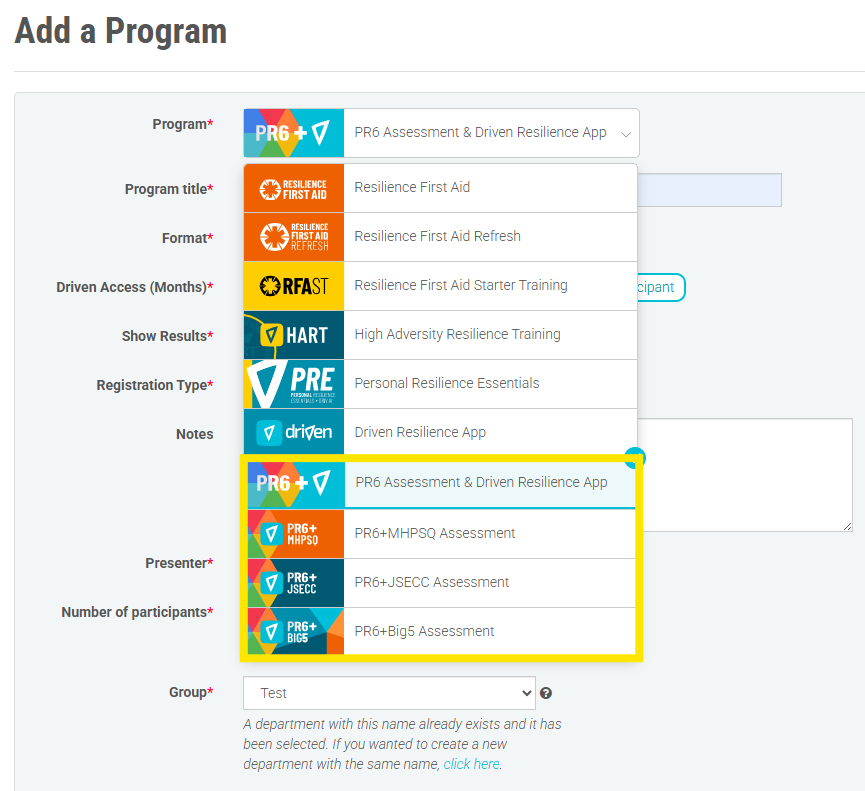
Select your desired assessment track in the Program field.
Choose your assessment format (PR6 Standard 16-item, PR6-50 Research, or PR6-Extended 80-item).
Set the platform access duration in the Driven Access (Months) field.
Assign participants to the program and launch the onboarding invitation.
(Add Program Dropdown Configuration Graphic)
ℹ️ Practitioner Notice: Administering specialized assessments (such as PR6E, JSECC, or Big5) requires an active Driven Pro account and the corresponding practitioner or instructor certification.
Comparing Assessment Results
To evaluate training impact and measure score growth over time:
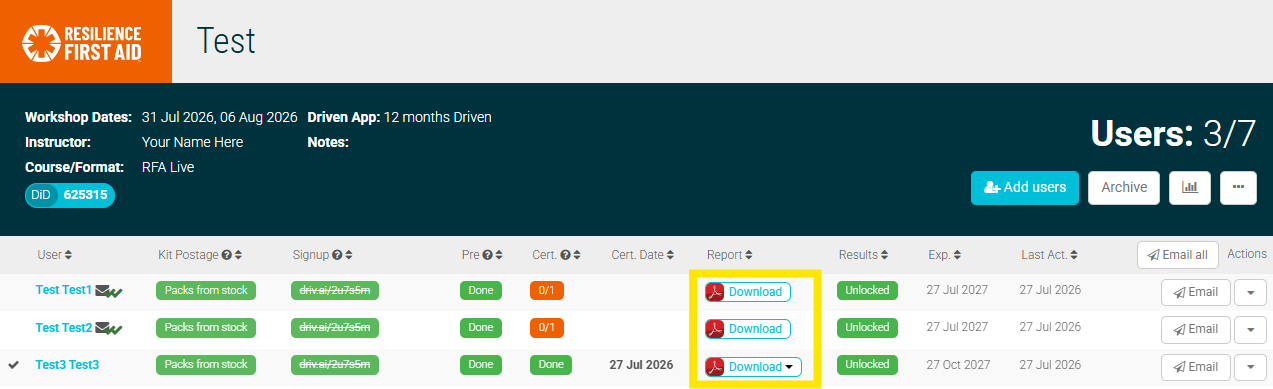
Individual Participant Comparison: Open Programs, select the participant, and download their Post-training Comparison Report from the Assessments / Reports menu.
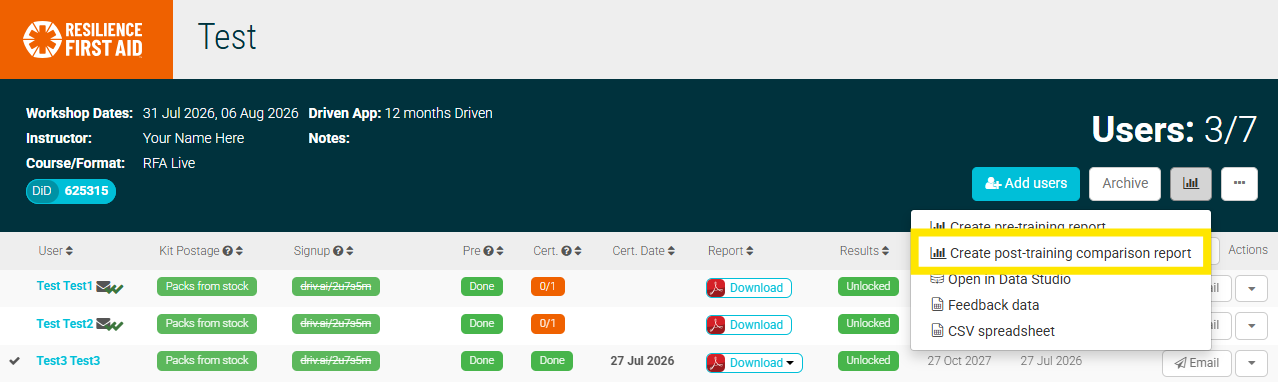
Group & Cohort Comparison: Go to Programs, click the Stats icon next to the program name, and select Create a group report of the Post-training Comparison.
Best Practices for Practitioners
Pre/Post Testing: Always administer baseline assessments prior to training kick-off and follow up with a post-training reassessment to quantify growth.
Targeted Interventions: Use domain-specific score gaps to tailor 1-on-1 coaching discussions or adjust upcoming workshop agendas.
Cross-Analysis: Combine PR6 score data with JSECC metrics to identify broader organizational risk factors and support team health.
Troubleshooting & Support
If you have questions about selecting assessment tracks, unlocking instructor certifications, or configuring program access durations, please contact our practitioner support team via Support in Driven Pro or email us directly at support@hellodriven.com.