
The Training Summary page feature is a valuable tool within the Driven Pro Admin Area, designed specifically for coaches who have completed the Certified Resilient Workplace (CReW) Partner training. This page helps you evaluate eligibility for CReW target levels and compile the necessary evidence for submitting and maintaining official certification as a Certified Resilience Workplace.
ℹ️ Access Requirement: The Training Summary Page is available exclusively to coaches who have completed the CReW Partner training and maintain an active Driven Pro account.
How to Access the Training Summary Page
Log in to your Driven Pro account.
Navigate to the Users section from the main menu.
Locate the group or department you wish to review.
Click on the Stats icon next to the group to open the Training Summary Page.

Features of the Training Summary Page
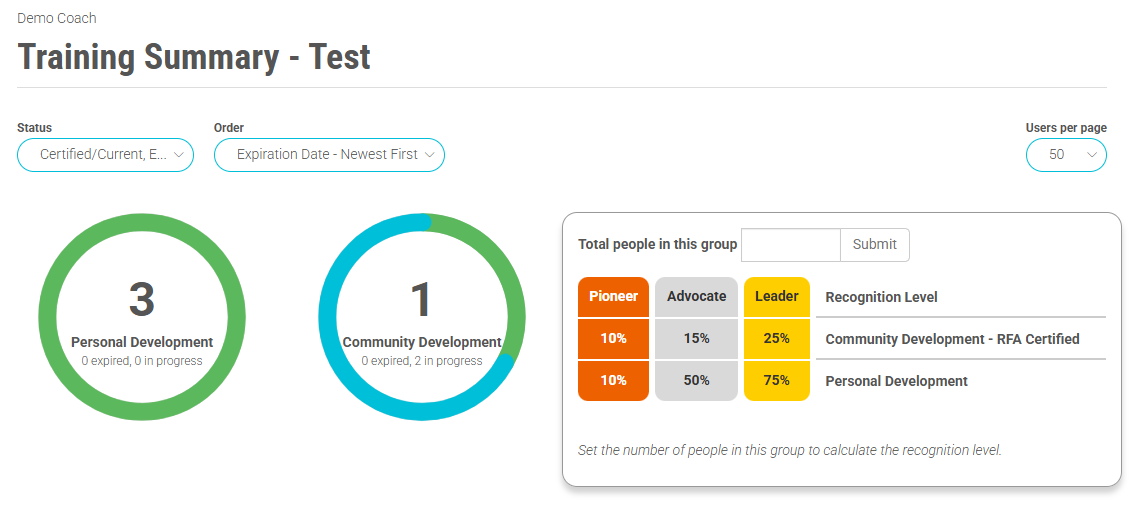
The Training Summary page provides comprehensive tracking for group participant statuses and training metrics:
Certification Status Tracking: View individual statuses within a group, including current certifications, in-progress certifications, certifications expiring soon, and expired certifications.
Communication Filters: Easily filter and email groups for streamlined communication and follow-up.
Participant Training Breakdown: Monitor participant counts registered for Personal Development training (focused on individual resilience skills) and Community Development training (focused on skills for community and cultural connection).
ℹ️ Note: The system tracks only registered individuals, not the total number of staff trained. You can manually input the total number of people in each group to accurately determine eligibility for CReW Pioneer, Advocate, or Leader status.
Understanding Training Types
Community Development: Training designed to build skills that enhance connection and awareness at a community or cultural level.
Personal Development: Training focused on strengthening personal resilience skills within individuals.
Calculating CReW Target Eligibility
Eligibility for CReW targets is based on the percentage of staff with valid RFA certifications in each group or department. To determine eligibility:
Input the total number of participants in each training group on the Training Summary Page.
Provide evidence for certifications, such as serial numbers, as required for official submissions.
ℹ️ Note: Maintaining your CReW status requires that these targets are met and sustained over time.
Tips for Using the Training Summary Page
Regularly update the total number of people in each group for accurate reporting.
Use the filter and email functions to efficiently manage certification renewals and communications.
Download reports as needed for record-keeping or submission purposes.
Troubleshooting & Support
If you have further questions or need assistance, please contact us at support@hellodriven.com. We're here to help you make the most of your Driven Pro experience and successfully achieve your CReW certification goals.